
introduction
Selon les statistiques pour 2020, jusqu'à 45% des employés des organisations ouvrent des e-mails de phishing, 20 à 30% cliquent sur des liens indésirables dans ces e-mails et 10 à 15% saisissent leurs informations d'identification sur les ressources de phishing. Ces pourcentages sont basés sur les facteurs suivants:
Les e-mails de phishing contournent tous les filtres anti-spam et sont livrés à leurs cibles (victimes)
les lettres contiennent des informations pertinentes pour les employés d'une organisation particulière pendant une certaine période.
. .
. , , smtp- rDNS , DNS- -, .
VPS - «» IP.
Ubuntu 18.04.5 LTS c :
Postfix 3.3.0-1
OpenDKIM 2.11.0
Dovecot 2.2.33.2
Certbot 0.27.0
"example.com" 192.168.10.0/24.
smtp-
smtp- Postfix. smtp- Postfix :
apt-get install postfix
Postfix «Internet Site» main.cf
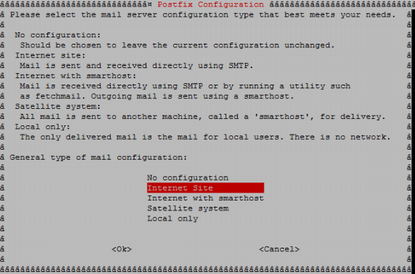
Postfix . , .
postconf –e 'myhostname=example.com'
postconf –e 'mynetworks=192.168.10.0/24'
OpenDKIM
, Postfix , , , smtp-.
DKIM Postfix. , . OpenDKIM - DKIM. OpenDKIM :
apt-get install opendkim opendkim-tools -y
C /etc/opendkim/example.com RSA.
openssl genrsa -out dkimprivate.key 1024
openssl rsa -pubout -in dkimprivate.key -out dkimpublic.key
: openssl, .. , opendkim-genkey, DKIM.
/etc/opendkim/TrustedHosts :
localhost
#
*.example.com
/etc/opendkim/signingtable, , , From, :
*@example.com mail._domainkey.example.com
/etc/opendkim/keytable, , :
mail._domainkey.example.com example.com:mail:/etc/opendkim/example.com/dkimprivate.key
/etc/opendkim.conf :
UMask 002 Domain example.com KeyFile /etc/opendkim/example.com/dkimprivate.key Selector mail UserID opendkim:opendkim SyslogSuccess Yes LogWhy Yes Background Yes Canonicalization relaxed/relaxed ExternalIgnoreList refile:/etc/opendkim/TrustedHosts InternalHosts refile:/etc/opendkim/TrustedHosts KeyTable refile:/etc/opendkim/keys/keytable SigningTable refile:/etc/opendkim/keys/signingtable Mode sv PidFile /var/run/opendkim/opendkim.pid SignatureAlgorithm rsa-sha256 Socket inet:8891@localhost
, :
Domain: ,
KeyFile: , RSA, openssl
UserID: , OpenDKIM
ExternalIgnoreList: , , .
InternalHosts: , , ,
KeyTable:
SigningTable: , , ":"
PidFile: PID ,
SignatureAlgorithm:
Socket: OpenDKIM. Postfix
Postfix OpenDKIM :
echo 'SOCKET="inet:8891@localhost"' >> /etc/default/opendkim
postconf -e milter_default_action=accept
postconf -e milter_protocol=2
postconf -e smtpd_milters = inet:localhost:8891
postconf -e non_smtpd_milters = $smtpd_milters
Postfix OpenDKIM . :
postfix check opendkim -n
, Postfix OpenDKIM :
systemctl restart postfix systemctl restart opendkim systemctl status postfix systemctl status opendkim
*
OpenDKIM , pid- opendkim.pid, /lib/systemd/system/opendkim.service :
#PIDFile=/var/run/opendkim/opendkim.pid
OpenDKIM.
DNS-
SPF DNS- :

:
v - , SPF1
ip4 - IP- ,
a - ,
mx - , MX
~all - , ip- ( «»).
DKIM DNS-:

:
v - , DKIM1
k – , RSA
p -
: RSA . /etc/opendkim/< >/dkimpublic.key
DMARC DNS-:

:
v - , DMARC1
p - , none - " , "
aspf - , r - ,
sp - , none - " , "
, . Mxtoolbox.
Dovecot Certbot
Dovecot Certbot. Dovecot , smtp-. Certbot SSL- Let's Encrypt. Dovecot Certbot :
apt-get install dovecot-imapd dovecot-pop3d certbot
Let's Encrypt :
certbot certonly --standalone -d example.com
/etc/letsencrypt/live/examle.com
Postfix. :
postconf -e smtpd_tls_cert_file = /etc/letsencrypt/live/example.com/fullchain.pem postconf -e smtpd_tls_key_file = /etc/letsencrypt/live/example.com/privkey.pem postconf -e smtp_tls_security_level = may postconf -e smtpd_tls_security_level = may postconf -e smtp_tls_note_starttls_offer = yes postconf -e smtpd_tls_loglevel = 1 postconf -e smtpd_tls_received_header = yes postconf -e smtpd_use_tls=yes postconf -e smtpd_sasl_type = dovecot postconf -e smtpd_sasl_path = private/auth postconf -e smtpd_sasl_local_domain = example.com postconf -e smtpd_sasl_security_options = noanonymous postconf -e broken_sasl_auth_clients = yes postconf -e smtpd_sasl_auth_enable = yes postconf -e smtpd_recipient_restrictions = permit_sasl_authenticated, permit_mynetworks, reject_unauth_destination
, :
smtpd_tls_cert_file - ,
smtpd_tls_key_file - ,
smtp_sasl_auth_enable - , sasl
smtpd_sasl_path - , SASL
smtp_sasl_security_options - , , . noplaintext - ,
smtp_sasl_type - sasl,
smtpd_recipient_restrictions - ,
. /etc/postfix/main.cf:
virtualaliasdomains = $mydomain
virtualaliasmaps = hash:/etc/postfix/virtual
/etc/postfix/virtual :
admin@example.com root
info@example.com root
/etc/postfix/master.cf :
-o smtpdtlswrappermode=yes
-o smtpdsaslauthenable=yes
-o smtpdmilters=inet:localhost:8891
Dovecot. /etc/dovecot/conf.d/10-auth.conf :
disableplaintextauth = yes
…
authmechanisms = plain login
/etc/dovecot/conf.d/10-mail.conf :
maillocation = maildir: ~ / Maildir
/etc/dovecot/conf.d/10-master.conf service auth :
service auth {
…
# Postfix smtp-auth
unixlistener / var / spool / postfix / private / auth {
mode = 0660
user = postfix
group = postfix
}
/etc/dovecot/conf.d/10-ssl.conf :
ssl = required
sslcert = </etc/letsencrypt/live/example.com/fullchain.pem
sslkey = </etc/letsencrypt/live/example.com/privkey.pem
sslprotocols = !SSLv3 !TLSv1.1 TLSv1.2
sslcipherlist = ALL:!LOW:!SSLv2:!EXP:!aNULL
*: , Certbot .
Postfix Dovecot, :
postfix check
dovecot -n
systemctl restart postfix
systemctl restart dovecot
systemctl status postfix
systemctl status dovecot
Postfix, Opendkim, Dovecot Mail-Tester, , , , .
echo "Test mail" | mail test-c69hzynjz@srv1.mail-tester.com -s "Hello" -a "MIME-Version: 1.0" -a "Content-Type: text/plain"
Ceci termine la phase préparatoire. Dans la prochaine partie de la série, nous explorerons le processus de développement de sujets pour les e-mails de phishing pour des résultats plus efficaces, le processus de formation de groupes cibles, et nous examinerons également quels outils sont les mieux adaptés pour créer des ressources Web de phishing et différents types d'e-mails.