Configuration à partir de zéro
Introduction, début
Installation et configuration de FreePBX
Connexion modem GSM
Configuration de fail2ban
Configuration de Mikrotik
Introduction, début
Un petit bureau avait besoin d'un PBX pour les appels en Russie et entre employés. Il y avait un choix entre l'utilisation de solutions prêtes à l'emploi de fournisseurs SIP et un PBX personnel fait maison. Chaque camp a ses avantages et ses inconvénients. Comme le bureau venait tout juste de démarrer, il y a peu d'employés, il y a un mode d'économie totale, puis j'ai refusé des fournisseurs - un abonnement pour le numéro (malgré le fait que le numéro soit donné à la ville, à laquelle il est difficile pour relier les messageries instantanées, les numéros mobiles du fournisseur n'inspirent pas confiance aux clients et ont également des problèmes de référence aux messagers) et les tarifs des appels vers les numéros mobiles des clients pour tous au moins 1,5 roubles / min.
Car Puisqu'un Raspberry Pi 3B + inutilisé était disponible, il a été décidé de l'utiliser comme PBX avec Asterisk. Carte MicroSD, de 8 Go, de préférence 16 Go pour l'installation du système. Il y a eu des tentatives pour installer la version nue à partir de zéro à l'aide de divers tutoriels du réseau, mais tous ont constamment eu des problèmes, tk. ils ont tous été écrits il y a 2 à 10 ans, ils n'ont pas fonctionné pour un démarrage rapide.
De plus, pour un travail autonome sans dépendance des fournisseurs, vous avez besoin d'un modem USB avec prise en charge des appels vocaux, il existe des listes de modems fonctionnant normalement (précédemment déverrouillés selon les instructions de 4PDA), j'ai un Huawei E1550.
Mikrotik RB951G, , OS ( , , ). IP , . ( , , , DDNS ).
FreePBX
http://www.raspberry-asterisk.org/ , raspbx-10-10-2020.zip. , Win32DiskImager, , , BalenaItcher. microSd, raspberry, ( , ), , . ip-dhcp server-leases , ssh.
http://raspbx/, , FreePBX, , . :

Putty asterisk, root/raspberry. :
passwd
, , , , .
Debian, . , , USB , MC :
raspbx-upgrade configure-timezone install-dongle apt install mc
dongle , ( ).
pjsip ( ), legacy sip, .
:
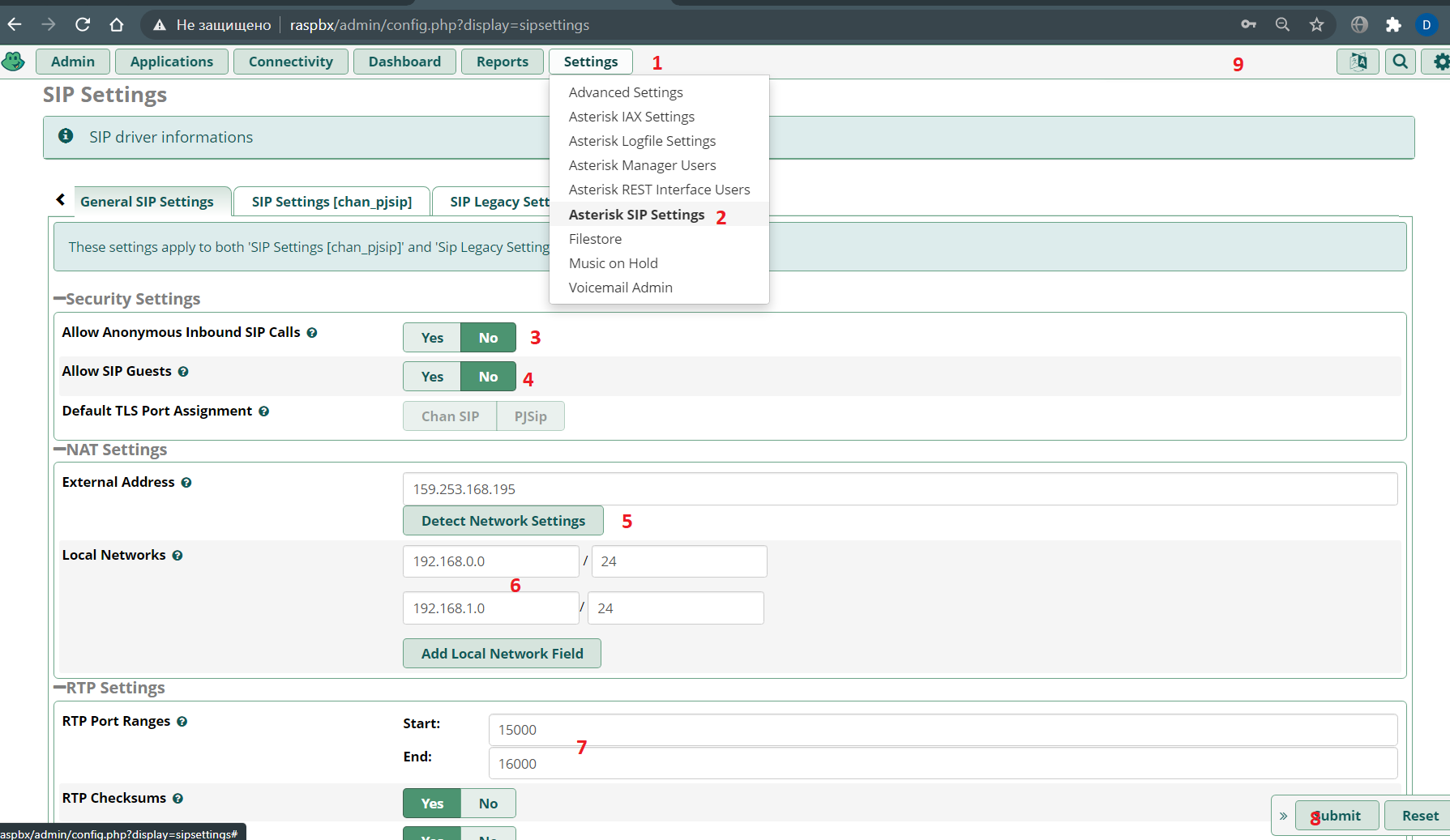
SIP legacy setting:

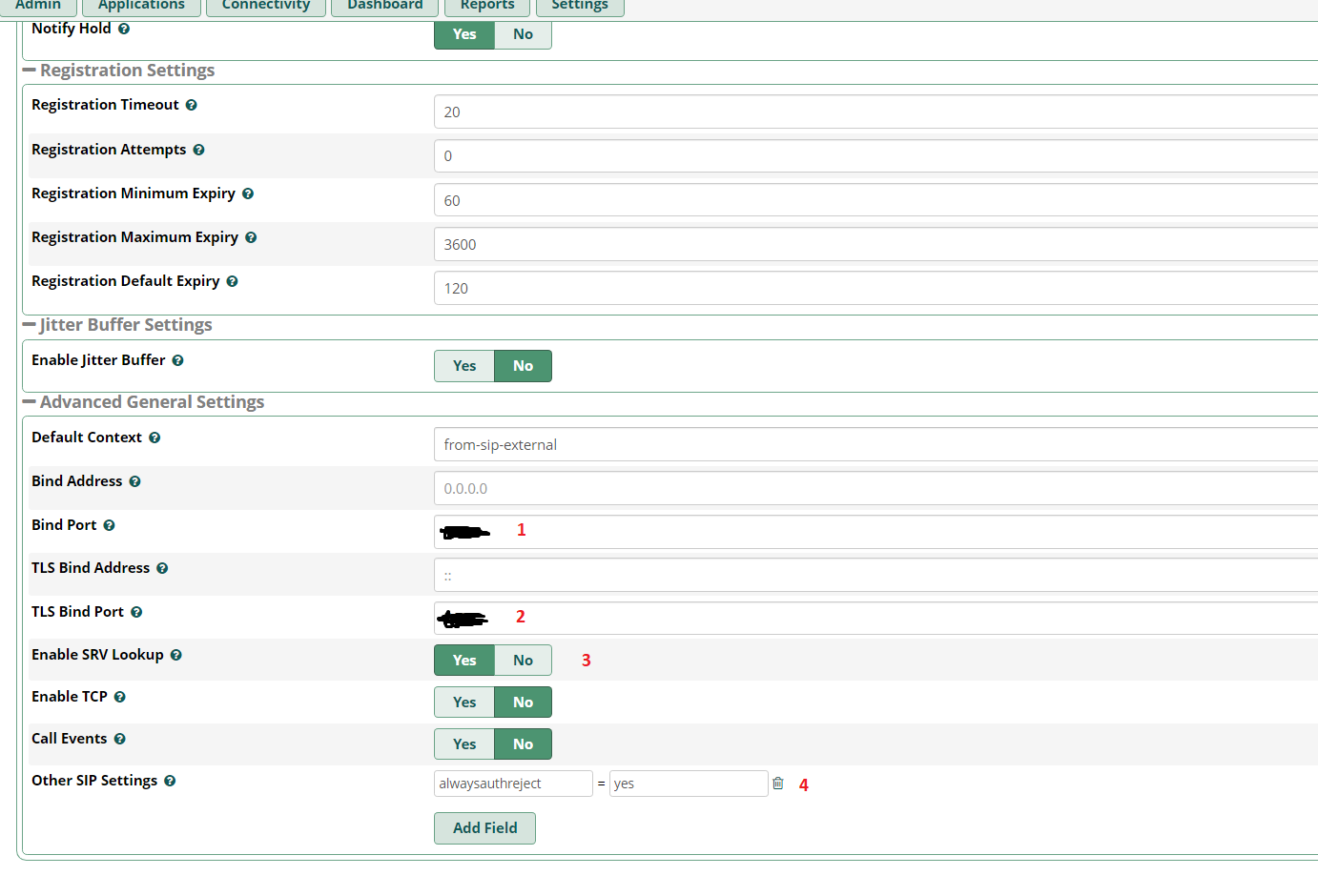
PJSIP, ( submit & apply config).
extension ( ):


, Submit & Apply config.
trunk :
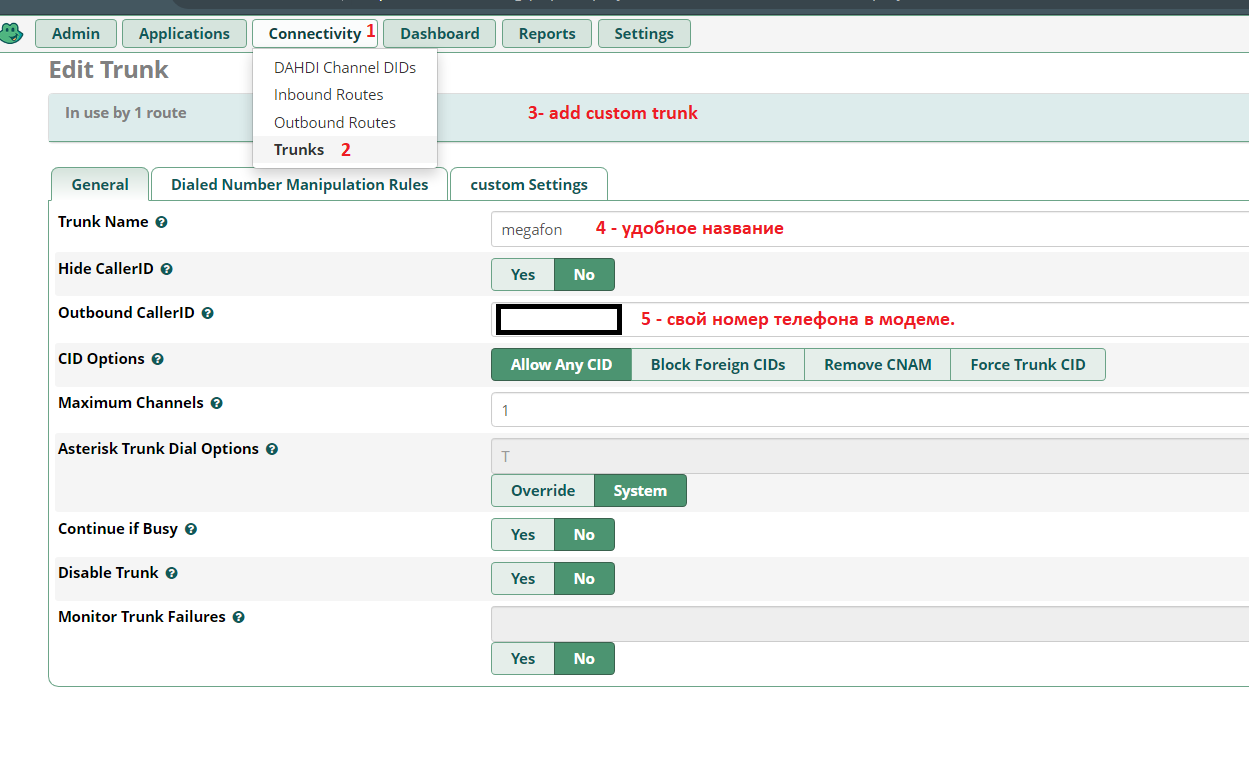


:

:


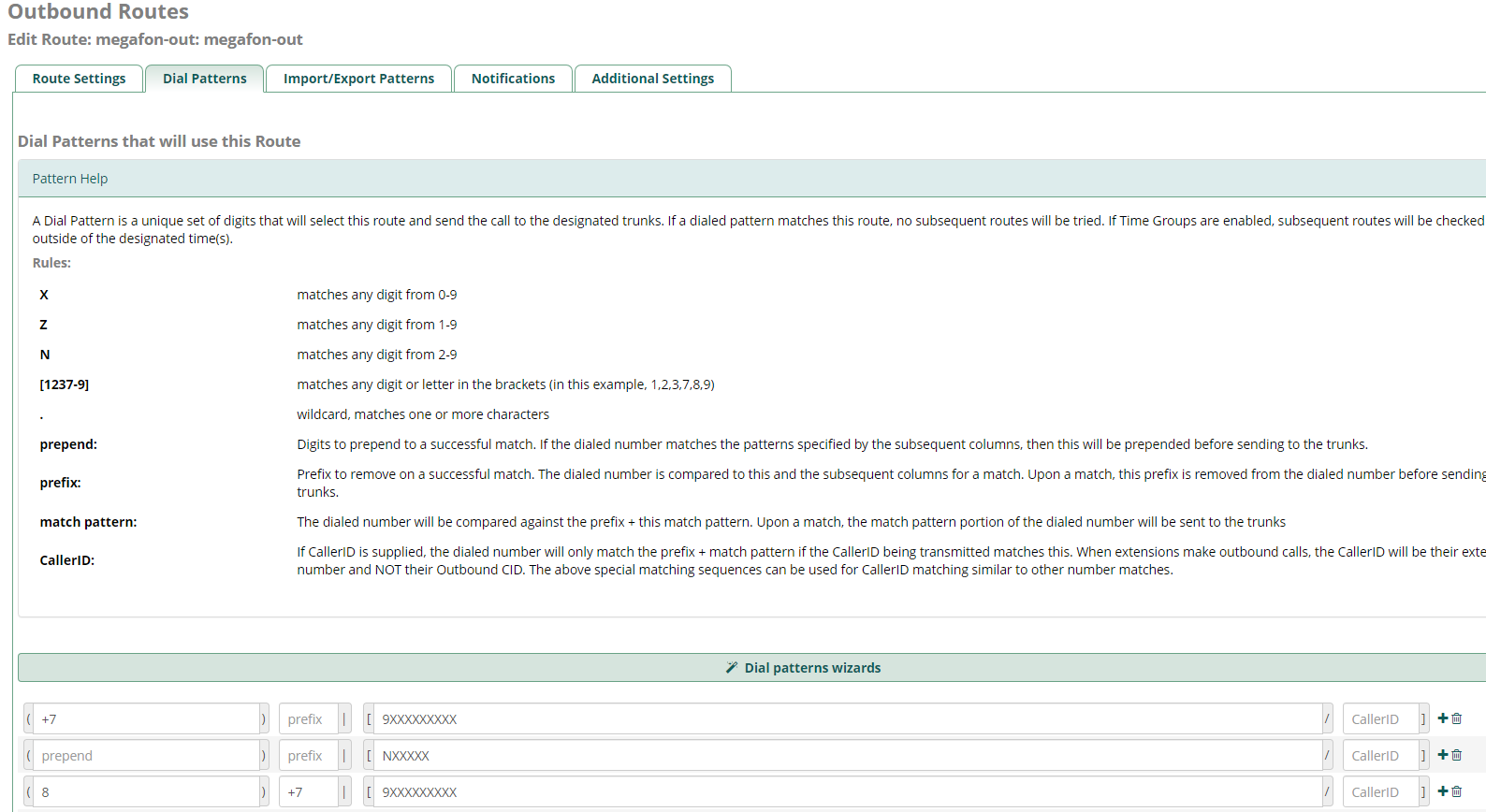
. Submit & Apply Config, .
GSM
:
:
GSM- « » ( AT^U2DIAG=0 ) 2G (AT^SYSCFG=13,1,3fffffff,0,0 ) Putty , raspberry, .
E171 -
E1550 -
E150 -
E3131 - ,
E352 -
GSM- HUAWEI E1550, ttyUSB*:
ls -al /dev | grep ttyUSB
crw-rw---- 1 root dialout 188, 0 27 11:34 ttyUSB0
crw-rw---- 1 root dialout 188, 1 27 11:33 ttyUSB1
crw-rw---- 1 root dialout 188, 2 27 12:37 ttyUSB2
GSM-, Asterisk , asterisk dialout. (nano /etc/udev/rules.d/92-dongle.rules) :
KERNEL=="ttyUSB*", MODE="0666", OWNER="asterisk", GROUP="dialout" |
raspberry reboot Putty.
dongle.conf ( nano /etc/asterisk/dongle.conf ) - exten imei , :
initstate=start ; specified initial state of device, must be one of 'stop' 'start' 'remote'
; 'remove' same as 'disable=yes'
exten=+79234567890 ; ,
dtmf=relax ; control of incoming DTMF detection, possible values:
; off - off DTMF tones detection, voice data passed to asterisk unalte$
; use this value for gateways or if not use DTMF for AVR or in$
; inband - do DTMF tones detection
; relax - like inband but with relaxdtmf option
; default is 'relax' by compatibility reason
; dongle required settings
[dongle0]
audio=/dev/ttyUSB1 ; tty port for audio connection; no default value
data=/dev/ttyUSB2 ; tty port for AT commands; no default value
imei=351234567898991 ; IMEI
;imsi=123456789012345
asterisk, chan_dongle . , GSM- asterisk:
root@raspbx:/# asterisk -rv
raspbx*CLI> dongle show devices
ID Group State RSSI Mode Submode Provider Name Model Firmware IMEI IMSI Number
dongle0 0 Free 26 3 3 MegaFon E1550 11.608.14.15.311 35******* 2**************3 Unknown
( extension) :
nano /etc/asterisk/extensions_custom.conf
[from-trunk-dongle]
; , sms.txt,
;exten => sms,1,Verbose(Incoming SMS from ${CALLERID(num)} ${BASE64_DECODE(${SMS_BASE64})})
;exten => sms,n,Set(FILE(/var/log/asterisk/sms.txt,,,a)=${STRFTIME(${EPOCH},,%Y-%m-%d %H:%M:%S)} - ${DONGLE$
;exten => sms,n,System(echo >> /var/log/asterisk/sms.txt)
;exten => sms,n,Hangup()
exten => _.,1,Set(CALLERID(name)=${CALLERID(num)})
exten => _.,n,Goto(from-trunk,${EXTEN},1)
; ,
exten => sms,1,Set(MESSAGE(body)=${BASE64_DECODE(${SMS_BASE64})})
exten => sms,n,System(echo '${STRFTIME(${EPOCH},,%Y-%m-%d %H:%M:%S)} - ${DONGLENAME} - ${CALLERID(num)}: ${$
exten => sms,n,Set(MESSAGE(from)="${CALLERID(num)}" <${CALLERID(num)}>)
exten => sms,n,Set(CALLERID(name)=${CALLERID(num)})
exten => sms,n,Verbose(1,${MESSAGE(from)})
exten => sms,n,MessageSend(sip:250,${MESSAGE(from)}) ; - 250
exten => sms,n,Hangup()
exten => ussd,1,Verbose(Incoming USSD: ${BASE64_DECODE(${USSD_BASE64})})
exten => ussd,n,System(echo '${STRFTIME(${EPOCH},,%Y-%m-%d %H:%M:%S)} - ${DONGLENAME}: ${BASE64_DECODE(${US$
exten => ussd,n,Hangup()
, , ( ) . .
Bluetooth , , , ( , - , ).
asterisk freepbx fail2ban (By @UKVoIPForums )
, :
install-fail2ban
:
sudo nano /etc/fail2ban/jail.local
jail.local
[DEFAULT]
# "ignoreip" can be an IP address, a CIDR mask or a DNS host. Fail2ban will not
# ban a host which matches an address in this list. Several addresses can be
# defined using space separator.
ignoreip = 127.0.0.1/8 ::1
[asterisk]
enabled = true
filter = asterisk
action = iptables-asterisk[name=asterisk]
logpath = /var/log/asterisk/security_log
bantime = 31536000
findtime = 86400
maxretry = 3
[sshd]
enabled = true
port = ssh
filter = sshd
logpath = /var/log/auth.log
banaction = iptables-allports
bantime = 31536000
findtime = 86400
maxretry = 3
[freepbx]
enabled = true
port = http,https
filter = freepbx
logpath = /var/log/asterisk/freepbx_security.log
bantime = 31536000
findtime = 86400
maxretry = 3
6 /, :
sudo nano /etc/fail2ban/filter.d/freepbx.conf
1. freepbx.conf
[INCLUDES]
before = common.conf
[Definition]
datepattern = ^\[%%Y-%%b-%%d %%H:%%M:%%S\]
failregex = \[freepbx_security\.NOTICE\]: Authentication failure for .* from <HOST>
sudo nano /etc/fail2ban/filter.d/asterisk.conf
2. asterisk.conf,
# Fail2Ban configuration file
#
#
# $Revision: 251 $
#
[INCLUDES]
# Read common prefixes. If any customizations available -- read them from
# common.local
before = common.conf
[Definition]
#_daemon = asterisk
# Option: failregex
# Notes.: regex to match the password failures messages in the logfile. The
# host must be matched by a group named "host". The tag "<HOST>" can
# be used for standard IP/hostname matching and is only an alias for
# (?:::f{4,6}:)?(?P<host>\S+)
# Values: TEXT
#
# Asterisk 1.8 uses Host:Port format which is reflected here
failregex = NOTICE.* .*: Registration from '.*' failed for '<HOST>:.*' - Wrong password
NOTICE.* .*: Registration from '.*' failed for '<HOST>:.*' - No matching peer found
NOTICE.* .*: Registration from '.*' failed for '<HOST>:.*' - Username/auth name mismatch
NOTICE.* .*: Registration from '.*' failed for '<HOST>:.*' - Device does not match ACL
NOTICE.* .*: Registration from '.*' failed for '<HOST>:.*' - Peer is not supposed to register
NOTICE.* .*: Registration from '.*' failed for '<HOST>:.*' - ACL error (permit/deny)
NOTICE.* .*: Registration from '.*' failed for '<HOST>:.*' - Device does not match ACL
NOTICE.* .*: Registration from '\".*\".*' failed for '<HOST>:.*' - No matching peer found
NOTICE.* .*: Registration from '\".*\".*' failed for '<HOST>:.*' - Wrong password
NOTICE.* <HOST> failed to authenticate as '.*'$
NOTICE.* .*: No registration for peer '.*' \(from <HOST>\)
NOTICE.* .*: Host <HOST> failed MD5 authentication for '.*' (.*)
NOTICE.* .*: Failed to authenticate user .*@<HOST>.*
NOTICE.* .*: <HOST> failed to authenticate as '.*'
NOTICE.* .*: <HOST> tried to authenticate with nonexistent user '.*'
SECURITY.* .*: SecurityEvent="ChallengeSent",.*,.*,Service="(PJ)?SIP",.*,AccountID="<unknown>",.*,.*,RemoteAddress=".*/.*/<HOST>/.*",Challenge=""
SECURITY.* .*: SecurityEvent="InvalidAccountID",.*,Severity="Error",Service="(PJ)?SIP",.*,.*,.*,.*,RemoteAddress=".*/.*/<HOST>/.*"
SECURITY.* .*: SecurityEvent="ChallengeResponseFailed",.*,Severity="Error",Service="(PJ)?SIP",.*,.*,.*,.*,RemoteAddress=".*/.*/<HOST>/.*",.*
SECURITY.* .*: SecurityEvent="InvalidPassword",.*,Severity="Error",Service="(PJ)?SIP",.*,.*,.*,.*,RemoteAddress=".*/.*/<HOST>/.*",.*
# Option: ignoreregex
# Notes.: regex to ignore. If this regex matches, the line is ignored.
# Values: TEXT
#
sudo nano /etc/fail2ban/action.d/iptables-asterisk.conf
3. iptables-asterisk.conf ( , SIP)
# Fail2Ban configuration file
#
# Author: Razvan Turtureanu
#
# $Revision$
#
[Definition]
# Option: actionstart
# Notes.: command executed once at the start of Fail2Ban.
# Values: CMD
#
actionstart = iptables -N fail2ban-<name>
iptables -A fail2ban-<name> -j RETURN
iptables -I <chain> -p tcp --dport 5061 -j fail2ban-<name>
iptables -I <chain> -p udp --dport 5060 -j fail2ban-<name>
iptables -I <chain> -p tcp --dport 5060 -j fail2ban-<name>
# Option: actionstop
# Notes.: command executed once at the end of Fail2Ban
# Values: CMD
#
actionstop = iptables -D <chain> -p tcp --dport 5061 -j fail2ban-<name>
iptables -D <chain> -p udp --dport 5060 -j fail2ban-<name>
iptables -D <chain> -p tcp --dport 5060 -j fail2ban-<name>
iptables -F fail2ban-<name>
iptables -X fail2ban-<name>
# Option: actioncheck
# Notes.: command executed once before each actionban command
# Values: CMD
#
actioncheck = iptables -n -L <chain> | grep -q fail2ban-<name>
# Option: actionban
# Notes.: command executed when banning an IP. Take care that the
# command is executed with Fail2Ban user rights.
# Tags: <ip> IP address
# <failures> number of failures
# <time> unix timestamp of the ban time
# Values: CMD
#
actionban = iptables -I fail2ban-<name> 1 -s <ip> -j DROP
# Option: actionunban
# Notes.: command executed when unbanning an IP. Take care that the
# command is executed with Fail2Ban user rights.
# Tags: <ip> IP address
# <failures> number of failures
# <time> unix timestamp of the ban time
# Values: CMD
#
actionunban = iptables -D fail2ban-<name> -s <ip> -j DROP
[Init]
# Defaut name of the chain
#
name = default
# Option: chain
# Notes specifies the iptables chain to which the fail2ban rules should be
# added
# Values: STRING Default: INPUT
chain = INPUT
sudo nano /etc/asterisk/logger_logfiles_custom.conf
4. logger_logfiles_custom.conf
security_log => SECURITY,NOTICE
sudo nano /etc/logrotate.d/asterisk-security
5. asterisk-security
/var/log/asterisk/security_log {
weekly
missingok
rotate 4
size 2000k
sharedscripts
create 0664 asterisk asterisk
su asterisk asterisk
postrotate
/usr/sbin/invoke-rc.d asterisk logger-reload > /dev/null 2> /dev/null
endscript
}
sudo nano /etc/logrotate.d/freepbx-security
6. freepbx-security
/var/log/asterisk/freepbx_security.log {
weekly
missingok
rotate 4
size 2000k
sharedscripts
create 0664 asterisk asterisk
su asterisk asterisk
postrotate
/usr/sbin/invoke-rc.d asterisk logger-reload > /dev/null 2> /dev/null
endscript
}
- reboot
fail2ban:
File permissions and owner/group information:
/etc/fail2ban/jail.local = rw-r--r-- root root
/etc/fail2ban/filter.d/freepbx.conf = rw-r--r-- root root
/etc/fail2ban/filter.d/asterisk.conf = rw-r--r-- root root
/etc/fail2ban/action.d/iptables-asterisk.conf = rw-r--r-- root root
/etc/asterisk/logger_logfiles_custom.conf = rw-rw-r-- asterisk asterisk
/etc/logrotate.d/asterisk_security = rw-r--r-- root root
Basic Fail2ban commands:
Start Fail2ban = sudo service fail2ban start
Stop Fail2ban = sudo service fail2ban stop
Restart Fail2ban = sudo service fail2ban restart
Get the current status of an individual jail:
FreePBX status = sudo fail2ban-client status freepbx
Asterisk status = sudo fail2ban-client status asterisk
SSHD status = sudo fail2ban-client status sshd
Ban/Unban IP addresses:
Ban IP = sudo fail2ban-client set *YOURJAILNAMEHERE banip IPADDRESSHERE
Unban IP = sudo fail2ban-client set *YOURJAILNAMEHERE unbanip IPADDRESSHERE
*Replace YOURJAILNAMEHERE with freepbx, asterisk or sshd.
*Replace IPADDRESSHERE with the IP address that you want to ban/unban.
Mikrotik
.
IP-Firewall- :
. tcp, 22,3389,8291


NAT (, SIP FreePBX), RTP

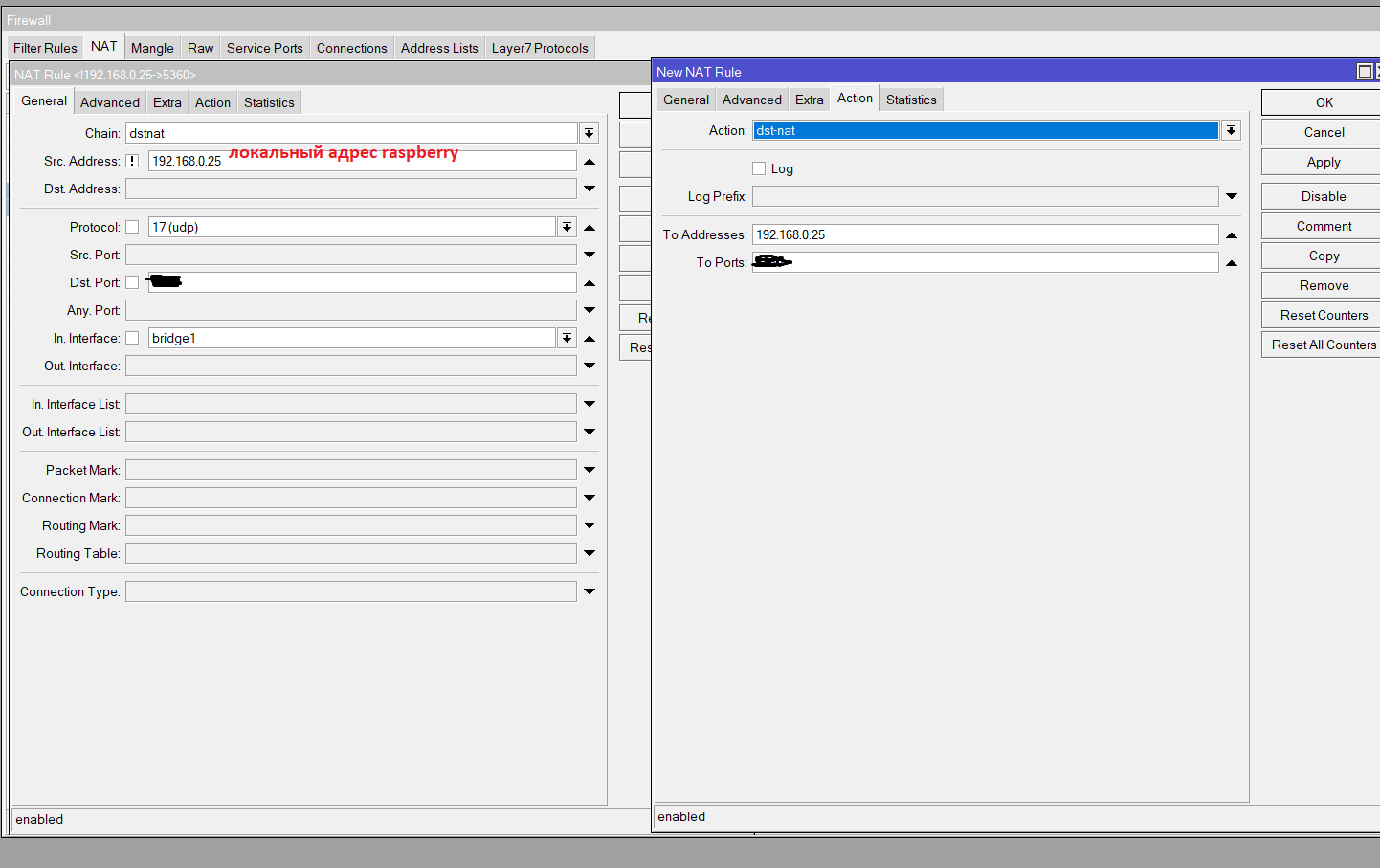
Il est également possible / souhaitable de redémarrer le système en mode automatique selon un calendrier, de réinitialiser le modem gelé, il a gelé après 5 jours de travail, et il n'y avait personne à côté, j'ai dû aller le surcharger manuellement.
crontab -e
# ( 5 )
0 5 * * * /sbin/reboot
Il est conseillé de configurer un accès VPN à Mikrotik à partir d'Internet pour gérer les situations d'urgence aux adresses des abonnés interdits au hasard.
Pendant longtemps, j'ai recueilli cette instruction de travail auprès de diverses sources. Peut-être que quelqu'un vous aidera.