Quand je travaille avec des fichiers dans Node.js, l'idée que j'écris beaucoup du même type de code ne me quitte pas. Créer, lire et écrire, déplacer, supprimer, contourner des fichiers et des sous-répertoires, tout cela est envahi par une quantité incroyable de passe-partout, qui est encore aggravé par les noms étranges des fonctions du module fs
. Vous pouvez vivre avec tout cela, mais la pensée de ce qui peut être fait plus commodément ne m'a pas quittée. Je voulais que des choses élémentaires comme, par exemple, lire ou écrire du texte (ou json) dans un fichier soient écrites sur une seule ligne.
À la suite de ces réflexions, la bibliothèque FSTB est apparue, dans laquelle j'ai essayé d'améliorer les façons d'interagir avec le système de fichiers. Vous pouvez décider si j'ai réussi ou non en lisant cet article et en essayant la bibliothèque en action.
Arrière-plan
Travailler avec des fichiers dans un nœud se déroule en plusieurs étapes: déni, colère, marchandage ... d' abord on obtient en quelque sorte le chemin de l'objet du système de fichiers, puis on vérifie son existence (si nécessaire), puis on travaille avec. Travailler avec des chemins dans un nœud est généralement déplacé vers un module séparé. La fonction la plus intéressante pour travailler avec des chemins est path.join
. Une chose vraiment cool qui, quand j'ai commencé à l'utiliser, m'a sauvé un tas de cellules nerveuses.
Mais il y a un problème avec les chemins. Le chemin est une chaîne, bien qu'il décrit essentiellement l'emplacement de l'objet dans la structure hiérarchique. Et puisque nous avons affaire à un objet, pourquoi ne pas utiliser les mêmes mécanismes pour travailler avec lui que lorsque vous travaillez avec des objets JavaScript ordinaires.
Le principal problème est qu'un objet de système de fichiers peut avoir n'importe quel nom parmi les caractères autorisés. Si je fais de cet objet des méthodes pour travailler avec lui, il s'avère que, par exemple, ce code: root.home.mydir.unlink
sera ambigu - mais que se passe-t-il si le répertoire mydir
a un répertoire unlink
? Et maintenant quoi? Est-ce que je veux supprimer mydir
ou faire référence unlink
?
Une fois, j'ai expérimenté Javascript Prox et j'ai proposé une construction intéressante:
const FSPath = function(path: string): FSPathType {
return new Proxy(() => path, {
get: (_, key: string) => FSPath(join(path, key)),
}) as FSPathType;
};
FSPath
– , , , , Proxy
, FSPath
, . , , :
FSPath(__dirname).node_modules // path.join(__dirname, "node_modules")
FSPath(__dirname)["package.json"] // path.join(__dirname, "package.json")
FSPath(__dirname)["node_modules"]["fstb"]["package.json"] // path.join(__dirname, "node_modules", "fstb", "package.json")
, , . :
const package_json = FSPath(__dirname).node_modules.fstb["package.json"]
console.log(package_json()) // < >/node_modules/fstb/package.json
, , JS. – , , :
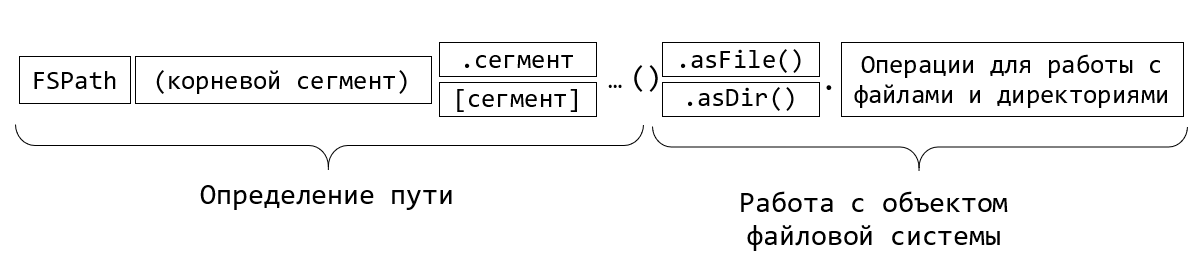
FSTB – FileSystem ToolBox.
FSTB:
npm i fstb
:
const fstb = require('fstb');
FSPath
, : cwd
, dirname
, home
tmp
( ). envPath
.
:
fstb.cwd["README.md"]().asFile().read.txt().then(txt=>console.log(txt));
FSTB , async/await:
(async function() {
const package_json = await fstb.cwd["package.json"]().asFile().read.json();
console.log(package_json);
})();
json . , , , .
, - :
const fs = require("fs/promises");
const path = require("path");
(async function() {
const package_json_path = path.join(process.cwd(), "package.json");
const file_content = await fs.readFile(package_json_path, "utf8");
const result = JSON.parse(file_content);
console.log(result);
})();
, , , .
const fs = require('fs');
const readline = require('readline');
async function processLineByLine() {
const fileStream = fs.createReadStream('input.txt');
const rl = readline.createInterface({
input: fileStream,
crlfDelay: Infinity
});
// Note: we use the crlfDelay option to recognize all instances of CR LF
// ('\r\n') in input.txt as a single line break.
for await (const line of rl) {
// Each line in input.txt will be successively available here as `line`.
console.log(`Line from file: ${line}`);
}
}
processLineByLine();
FSTB:
(async function() {
await fstb.cwd['package.json']()
.asFile()
.read.lineByLine()
.forEach(line => console.log(`Line from file: ${line}`));
})();
, . , . , , filter
, map
, reduce
.. , , , csv, .map(line => line.split(','))
.
, . . :
(async function() {
const string_to_write = ' !';
await fstb.cwd['habr.txt']()
.asFile()
.write.txt(string_to_write);
})();
:
await fstb.cwd['habr.txt']()
.asFile()
.write.appendFile(string_to_write, {encoding:"utf8"});
json:
(async function() {
const object_to_write = { header: ' !', question: ' ', answer: 42 };
await fstb.cwd['habr.txt']()
.asFile()
.write.json(object_to_write);
})();
:
(async function() {
const file = fstb.cwd['million_of_randoms.txt']().asFile();
//
const stream = file.write.createWriteStream();
stream.on('open', () => {
for (let index = 0; index < 1_000_000; index++) {
stream.write(Math.random() + '\n');
}
stream.end();
});
await stream;
//
const lines = await file.read.lineByLine().reduce(acc => ++acc, 0);
console.log(`${lines} lines count`);
})();
, ? :
await stream; // <= WTF?!!
, WriteStream
, . , , , await
. , await
.
, , . FSTB? , fs.
:
const stat = await file.stat()
console.log(stat);
:
Stats {
dev: 1243191443,
mode: 33206,
nlink: 1,
uid: 0,
gid: 0,
rdev: 0,
blksize: 4096,
ino: 26740122787869450,
size: 19269750,
blocks: 37640,
atimeMs: 1618579566188.5884,
mtimeMs: 1618579566033.8242,
ctimeMs: 1618579566033.8242,
birthtimeMs: 1618579561341.9297,
atime: 2021-04-16T13:26:06.189Z,
mtime: 2021-04-16T13:26:06.034Z,
ctime: 2021-04-16T13:26:06.034Z,
birthtime: 2021-04-16T13:26:01.342Z
}
-:
const fileHash = await file.hash.md5();
console.log("File md5 hash:", fileHash);
// File md5 hash: 5a0a221c0d24154b850635606e9a5da3
:
const renamedFile = await file.rename(`${fileHash}.txt`);
:
// ,
// "temp"
const targetDir = renamedFile.fsdir.fspath.temp().asDir()
if(!(await targetDir.isExists())) await targetDir.mkdir()
//
const fileCopy = await renamedFile.copyTo(targetDir)
const fileCopyHash = await fileCopy.hash.md5();
console.log("File copy md5 hash:", fileCopyHash);
// File md5 hash: 5a0a221c0d24154b850635606e9a5da3
:
await renamedFile.unlink();
, , :
console.log({
isExists: await file.isExists(),
isReadable: await file.isReadable(),
isWritable: await file.isWritable() });
, , , .
:
, – . , . , FSTB . FSDir
, :
// FSDir node_modules:
const node_modules = fstb.cwd.node_modules().asDir();
? -, :
//
await node_modules.subdirs().forEach(async dir => console.log(dir.name));
filter, map, reduce, forEach, toArray. , , «@» .
const ileSizes = await node_modules
.subdirs()
.filter(async dir => dir.name.startsWith('@'))
.map(async dir => ({ name: dir.name, size: await dir.totalSize() })).toArray();
fileSizes.sort((a,b)=>b.size-a.size);
console.table(fileSizes);
- :
┌─────────┬──────────────────────┬─────────┐
│ (index) │ name │ size │
├─────────┼──────────────────────┼─────────┤
│ 0 │ '@babel' │ 6616759 │
│ 1 │ '@typescript-eslint' │ 2546010 │
│ 2 │ '@jest' │ 1299423 │
│ 3 │ '@types' │ 1289380 │
│ 4 │ '@webassemblyjs' │ 710238 │
│ 5 │ '@nodelib' │ 512000 │
│ 6 │ '@rollup' │ 496226 │
│ 7 │ '@bcoe' │ 276877 │
│ 8 │ '@xtuc' │ 198883 │
│ 9 │ '@istanbuljs' │ 70704 │
│ 10 │ '@sinonjs' │ 37264 │
│ 11 │ '@cnakazawa' │ 25057 │
│ 12 │ '@size-limit' │ 14831 │
│ 13 │ '@polka' │ 6953 │
└─────────┴──────────────────────┴─────────┘
, , ))
. , typescript . , :
const ts_versions = await node_modules
.subdirs()
.map(async dir => ({
dir,
package_json: dir.fspath['package.json']().asFile(),
}))
// package.json
.filter(async ({ package_json }) => await package_json.isExists())
// package.json
.map(async ({ dir, package_json }) => ({
dir,
content: await package_json.read.json(),
}))
// devDependencies.typescript package.json
.filter(async ({ content }) => content.devDependencies?.typescript)
// typescript
.map(async ({ dir, content }) => ({
name: dir.name,
ts_version: content.devDependencies.typescript,
}))
.toArray();
console.table(ts_versions);
:
┌─────────┬─────────────────────────────┬───────────────────────┐
│ (index) │ name │ ts_version │
├─────────┼─────────────────────────────┼───────────────────────┤
│ 0 │ 'ajv' │ '^3.9.5' │
│ 1 │ 'ast-types' │ '3.9.7' │
│ 2 │ 'axe-core' │ '^3.5.3' │
│ 3 │ 'bs-logger' │ '3.x' │
│ 4 │ 'chalk' │ '^2.5.3' │
│ 5 │ 'chrome-trace-event' │ '^2.8.1' │
│ 6 │ 'commander' │ '^3.6.3' │
│ 7 │ 'constantinople' │ '^2.7.1' │
│ 8 │ 'css-what' │ '^4.0.2' │
│ 9 │ 'deepmerge' │ '=2.2.2' │
│ 10 │ 'enquirer' │ '^3.1.6' │
...
?
. fspath:
// FSDir node_modules:
const node_modules = fstb.cwd.node_modules().asDir();
// "package.json" "fstb"
const package_json = node_modules.fspath.fstb["package.json"]().asFile()
, temp . FSTB mkdtemp
.
mkdir
. copyTo
moveTo
. - rmdir
( ) rimraf
( ).
:
//
const temp_dir = await fstb.mkdtemp("fstb-");
if(await temp_dir.isExists()) console.log(" ")
// : src, target1 target2
const src = await temp_dir.fspath.src().asDir().mkdir();
const target1 = await temp_dir.fspath.target1().asDir().mkdir();
const target2 = await temp_dir.fspath.target2().asDir().mkdir();
// src :
const test_txt = src.fspath["test.txt"]().asFile();
await test_txt.write.txt(", !");
// src target1
const src_copied = await src.copyTo(target1);
// src target2
const src_movied = await src.moveTo(target2);
//
// subdirs(true) –
await temp_dir.subdirs(true).forEach(async dir=>{
await dir.files().forEach(async file=>console.log(file.path))
})
// ,
console.log(await src_copied.fspath["test.txt"]().asFile().read.txt())
console.log(await src_movied.fspath["test.txt"]().asFile().read.txt())
//
await temp_dir.rimraf()
if(!(await temp_dir.isExists())) console.log(" ")
:
C:\Users\debgger\AppData\Local\Temp\fstb-KHT0zv\target1\src\test.txt C:\Users\debgger\AppData\Local\Temp\fstb-KHT0zv\target2\src\test.txt , ! , !
, , . , join’ , .
, Node.js. , . FSTB . , , , , .
, FSTB, :
.
, IDE .
,
Node.js 10- ,
, , , FSPath, , , . .
, , . , . , , .
GitHub: https://github.com/debagger/fstb
: https://debagger.github.io/fstb/
Merci de votre attention!