Dans cet article, je vais vous expliquer et vous montrer comment créer de belles listes animées basées sur RecyclerView et MotionLayout. J'ai utilisé une méthode similaire dans l'un de mes projets.
Du traducteur: Le référentiel de l'auteur de l'article est https://github.com/mjmanaog/foodbuddy .
Je l'ai bifurqué pour traduire. Peut-être que la «version russe» conviendra davantage à quelqu'un.
Qu'est-ce que MotionLayout?
En bref, MotionLayout est une sous-classe ConstraintLayout qui vous permet de décrire le mouvement et l'animation des éléments qui s'y trouvent à l'aide de XML. Plus de détails - dans la documentation et ici avec des exemples.
Alors, commençons.
Étape 1: créer un nouveau projet
Appelons ça comme vous voulez. Sélectionnez Activité vide comme activité.
Étape 2: ajoutez les dépendances requises
Ajoutez au fichier gradle de l'application:
implementation 'androidx.constraintlayout:constraintlayout:2.0.0-beta1'
Et commençons la synchronisation (Sync Now dans le coin supérieur droit).
Étape 3: créer une mise en page
Notre futur élément de liste ressemblera à ceci:

res/layout item_food.
<?xml version="1.0" encoding="utf-8"?>
<androidx.constraintlayout.widget.ConstraintLayout xmlns:android="http://schemas.android.com/apk/res/android"
xmlns:app="http://schemas.android.com/apk/res-auto"
xmlns:tools="http://schemas.android.com/tools"
android:id="@+id/clMain"
android:layout_width="match_parent"
android:layout_height="wrap_content"
app:layoutDescription="@xml/item_food_scene">
<ImageView
android:id="@+id/ivFood"
android:layout_width="150dp"
android:layout_height="150dp"
android:layout_marginTop="8dp"
android:elevation="10dp"
android:scaleType="fitXY"
app:layout_constraintBottom_toBottomOf="parent"
app:layout_constraintStart_toStartOf="parent"
app:layout_constraintTop_toTopOf="parent"
app:srcCompat="@drawable/img_salmon_salad" />
<androidx.cardview.widget.CardView
android:id="@+id/cardView"
android:layout_width="match_parent"
android:layout_height="150dp"
android:layout_marginStart="100dp"
android:layout_marginLeft="100dp"
android:layout_marginTop="16dp"
android:layout_marginEnd="16dp"
android:layout_marginRight="16dp"
android:layout_marginBottom="16dp"
app:cardCornerRadius="20dp"
app:layout_constraintBottom_toBottomOf="parent"
app:layout_constraintEnd_toEndOf="parent"
app:layout_constraintStart_toStartOf="parent"
app:layout_constraintTop_toTopOf="parent">
<androidx.constraintlayout.widget.ConstraintLayout
android:layout_width="match_parent"
android:layout_height="match_parent">
<TextView
android:id="@+id/tvTitle"
android:layout_width="0dp"
android:layout_height="wrap_content"
android:layout_marginStart="60dp"
android:layout_marginLeft="60dp"
android:layout_marginTop="24dp"
android:layout_marginEnd="8dp"
android:layout_marginRight="8dp"
android:textSize="18sp"
android:textStyle="bold"
app:layout_constraintEnd_toEndOf="parent"
app:layout_constraintStart_toStartOf="parent"
app:layout_constraintTop_toTopOf="parent"
tools:text=" " />
<TextView
android:id="@+id/tvDescription"
android:layout_width="0dp"
android:layout_height="wrap_content"
android:layout_marginStart="60dp"
android:layout_marginLeft="60dp"
android:layout_marginEnd="16dp"
android:layout_marginRight="8dp"
android:ellipsize="end"
android:maxLines="3"
app:layout_constraintEnd_toEndOf="parent"
app:layout_constraintStart_toStartOf="parent"
app:layout_constraintTop_toBottomOf="@+id/tvTitle"
tools:text=" — . , : , ." />
<TextView
android:id="@+id/tvCalories"
android:layout_width="wrap_content"
android:layout_height="wrap_content"
android:layout_marginStart="8dp"
android:layout_marginLeft="8dp"
android:layout_marginBottom="16dp"
android:textStyle="bold"
app:layout_constraintBottom_toBottomOf="parent"
app:layout_constraintStart_toEndOf="@+id/imageView6"
tools:text="80 " />
<ImageView
android:id="@+id/imageView6"
android:layout_width="24dp"
android:layout_height="24dp"
android:layout_marginStart="60dp"
android:layout_marginLeft="60dp"
android:layout_marginBottom="16dp"
app:layout_constraintBottom_toBottomOf="parent"
app:layout_constraintStart_toStartOf="parent"
app:srcCompat="@drawable/ic_calories" />
<ImageView
android:id="@+id/imageView7"
android:layout_width="24dp"
android:layout_height="24dp"
android:layout_marginStart="24dp"
android:layout_marginLeft="24dp"
android:layout_marginBottom="16dp"
app:layout_constraintBottom_toBottomOf="parent"
app:layout_constraintStart_toEndOf="@+id/tvCalories"
app:srcCompat="@drawable/ic_star" />
<TextView
android:id="@+id/tvRate"
android:layout_width="wrap_content"
android:layout_height="wrap_content"
android:layout_marginStart="8dp"
android:layout_marginLeft="8dp"
android:layout_marginBottom="16dp"
app:layout_constraintBottom_toBottomOf="parent"
app:layout_constraintStart_toEndOf="@+id/imageView7"
tools:text="4.5" />
</androidx.constraintlayout.widget.ConstraintLayout>
</androidx.cardview.widget.CardView>
</androidx.constraintlayout.widget.ConstraintLayout>
4: ConstraintLayout MotionLayout
ConstraintLayout MotionLayout:
Split Design;
(Component Tree) ( — clMain);
Convert to MotionLayout.
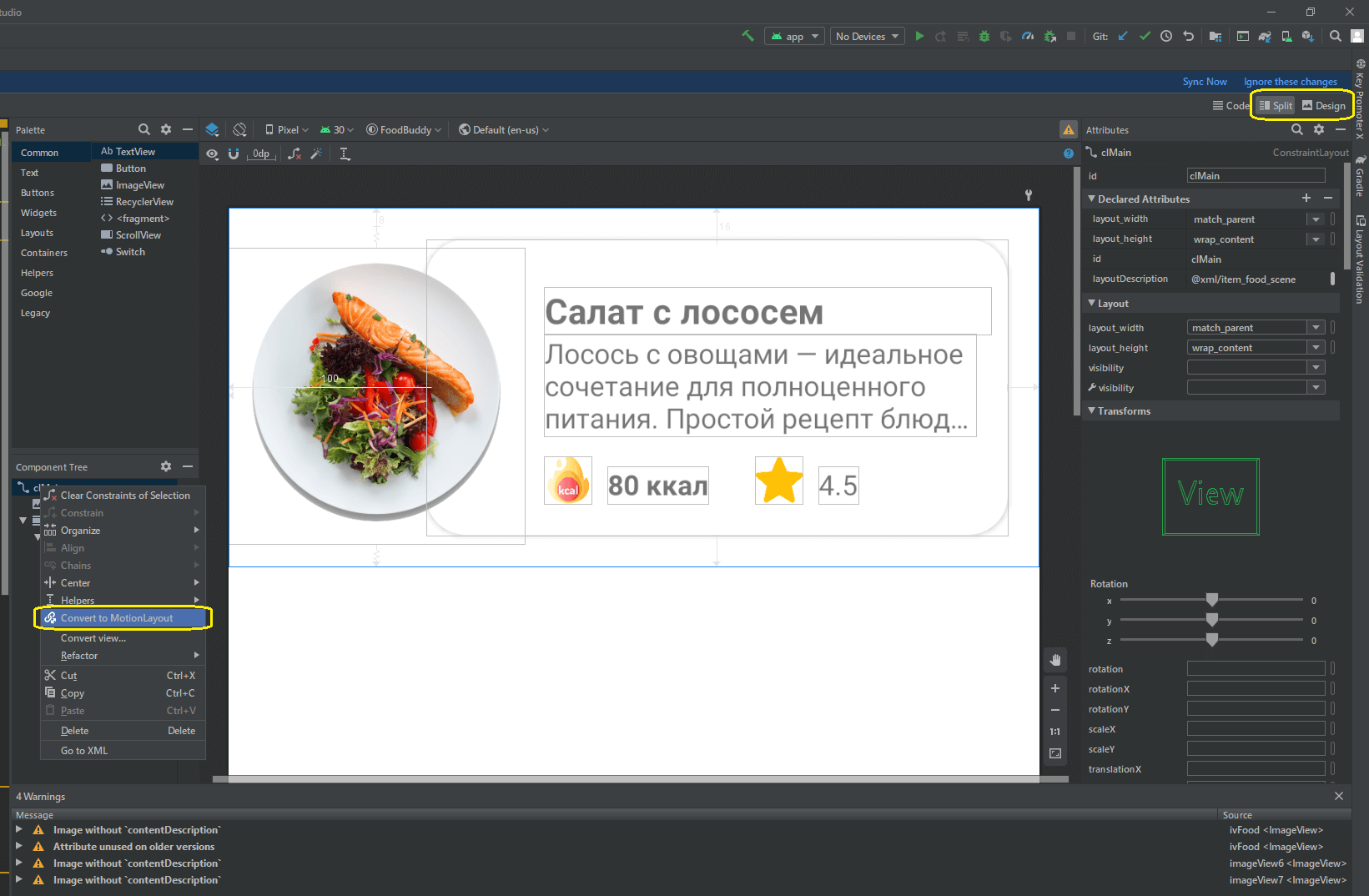
MotionLayout.
item_food
<?xml version="1.0" encoding="utf-8"?>
<androidx.constraintlayout.motion.widget.MotionLayout xmlns:android="http://schemas.android.com/apk/res/android"
xmlns:app="http://schemas.android.com/apk/res-auto"
xmlns:tools="http://schemas.android.com/tools"
android:id="@+id/clMain"
android:layout_width="match_parent"
android:layout_height="wrap_content"
app:layoutDescription="@xml/item_food_scene">
<ImageView
android:id="@+id/ivFood"
android:layout_width="150dp"
android:layout_height="150dp"
android:layout_marginTop="8dp"
android:elevation="10dp"
android:scaleType="fitXY"
app:layout_constraintBottom_toBottomOf="parent"
app:layout_constraintStart_toStartOf="parent"
app:layout_constraintTop_toTopOf="parent"
app:srcCompat="@drawable/img_salmon_salad" />
<androidx.cardview.widget.CardView
android:id="@+id/cardView"
android:layout_width="match_parent"
android:layout_height="150dp"
android:layout_marginStart="100dp"
android:layout_marginLeft="100dp"
android:layout_marginTop="16dp"
android:layout_marginEnd="16dp"
android:layout_marginRight="16dp"
android:layout_marginBottom="16dp"
app:cardCornerRadius="20dp"
app:layout_constraintBottom_toBottomOf="parent"
app:layout_constraintEnd_toEndOf="parent"
app:layout_constraintStart_toStartOf="parent"
app:layout_constraintTop_toTopOf="parent">
<androidx.constraintlayout.widget.ConstraintLayout
android:layout_width="match_parent"
android:layout_height="match_parent">
<TextView
android:id="@+id/tvTitle"
android:layout_width="0dp"
android:layout_height="wrap_content"
android:layout_marginStart="60dp"
android:layout_marginLeft="60dp"
android:layout_marginTop="24dp"
android:layout_marginEnd="8dp"
android:layout_marginRight="8dp"
android:textSize="18sp"
android:textStyle="bold"
app:layout_constraintEnd_toEndOf="parent"
app:layout_constraintStart_toStartOf="parent"
app:layout_constraintTop_toTopOf="parent"
tools:text=" " />
<TextView
android:id="@+id/tvDescription"
android:layout_width="0dp"
android:layout_height="wrap_content"
android:layout_marginStart="60dp"
android:layout_marginLeft="60dp"
android:layout_marginEnd="16dp"
android:layout_marginRight="8dp"
android:ellipsize="end"
android:maxLines="3"
app:layout_constraintEnd_toEndOf="parent"
app:layout_constraintStart_toStartOf="parent"
app:layout_constraintTop_toBottomOf="@+id/tvTitle"
tools:text=" — . , : , ." />
<TextView
android:id="@+id/tvCalories"
android:layout_width="wrap_content"
android:layout_height="wrap_content"
android:layout_marginStart="8dp"
android:layout_marginLeft="8dp"
android:layout_marginBottom="16dp"
android:textStyle="bold"
app:layout_constraintBottom_toBottomOf="parent"
app:layout_constraintStart_toEndOf="@+id/imageView6"
tools:text="80 " />
<ImageView
android:id="@+id/imageView6"
android:layout_width="24dp"
android:layout_height="24dp"
android:layout_marginStart="60dp"
android:layout_marginLeft="60dp"
android:layout_marginBottom="16dp"
app:layout_constraintBottom_toBottomOf="parent"
app:layout_constraintStart_toStartOf="parent"
app:srcCompat="@drawable/ic_calories" />
<ImageView
android:id="@+id/imageView7"
android:layout_width="24dp"
android:layout_height="24dp"
android:layout_marginStart="24dp"
android:layout_marginLeft="24dp"
android:layout_marginBottom="16dp"
app:layout_constraintBottom_toBottomOf="parent"
app:layout_constraintStart_toEndOf="@+id/tvCalories"
app:srcCompat="@drawable/ic_star" />
<TextView
android:id="@+id/tvRate"
android:layout_width="wrap_content"
android:layout_height="wrap_content"
android:layout_marginStart="8dp"
android:layout_marginLeft="8dp"
android:layout_marginBottom="16dp"
app:layout_constraintBottom_toBottomOf="parent"
app:layout_constraintStart_toEndOf="@+id/imageView7"
tools:text="4.5" />
</androidx.constraintlayout.widget.ConstraintLayout>
</androidx.cardview.widget.CardView>
</androidx.constraintlayout.motion.widget.MotionLayout>
res xml item_food_scene.xml:
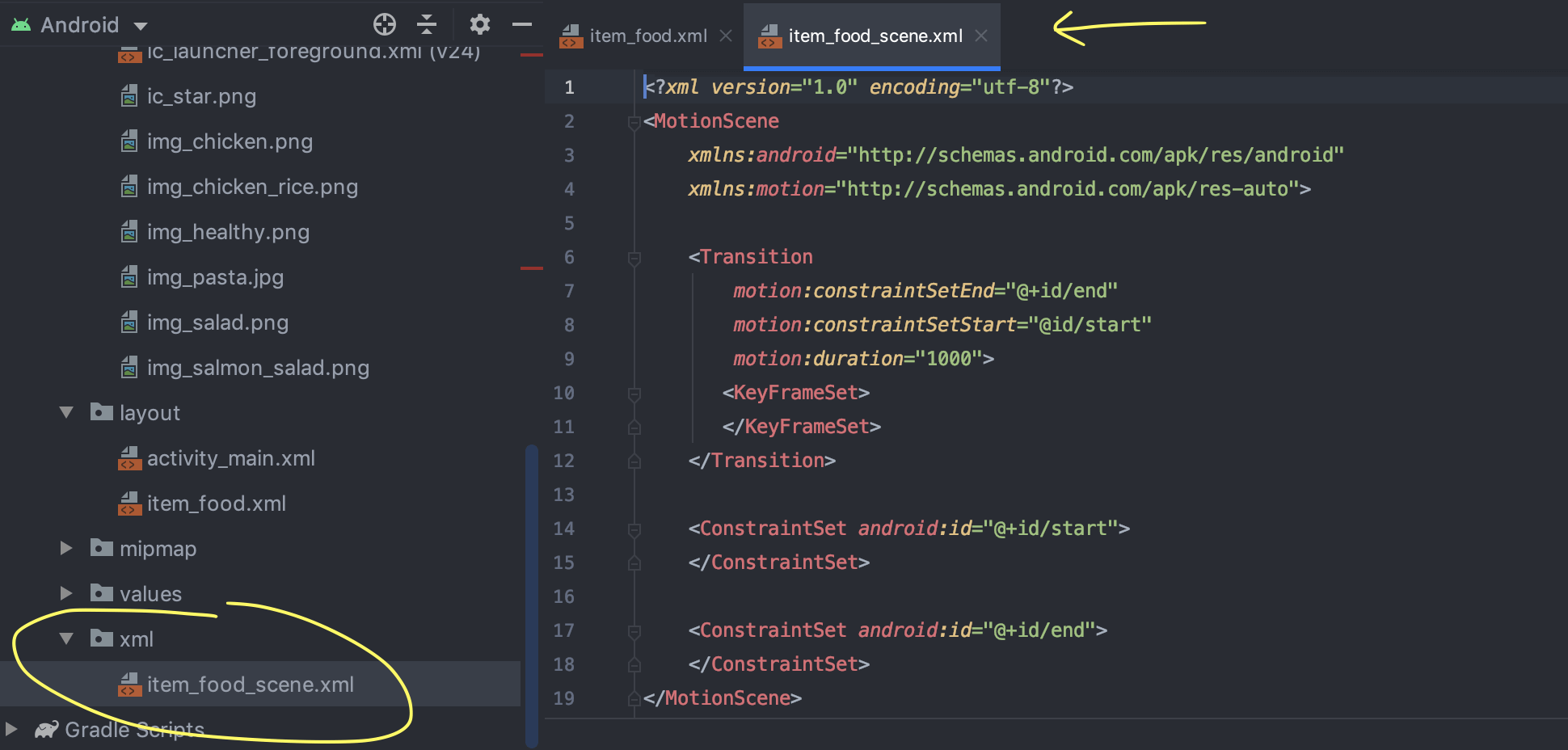
(Warnings ), ImageView contentDescription. , XML- ( , ).
5: ImageView

ivFood (ImageView );
MotionLayout end;
ivFood (End) (End) ;
;
layout_height layout_width 300dp.
: ImageView ( , ) , : ( 150dp 300dp).
6: ,
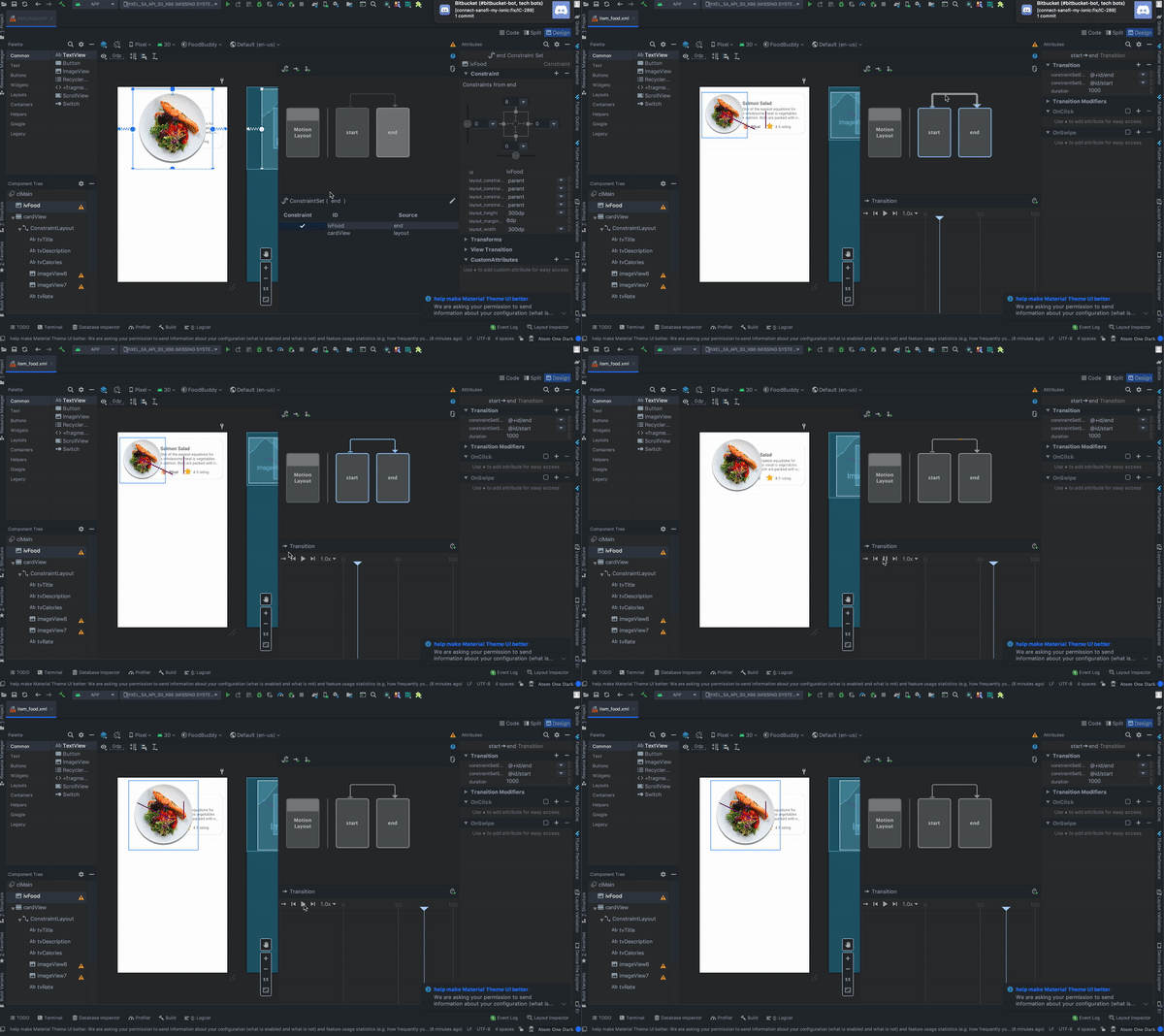
, :
MotionLayout , start end;
Transition;
Play, .
7: CardView
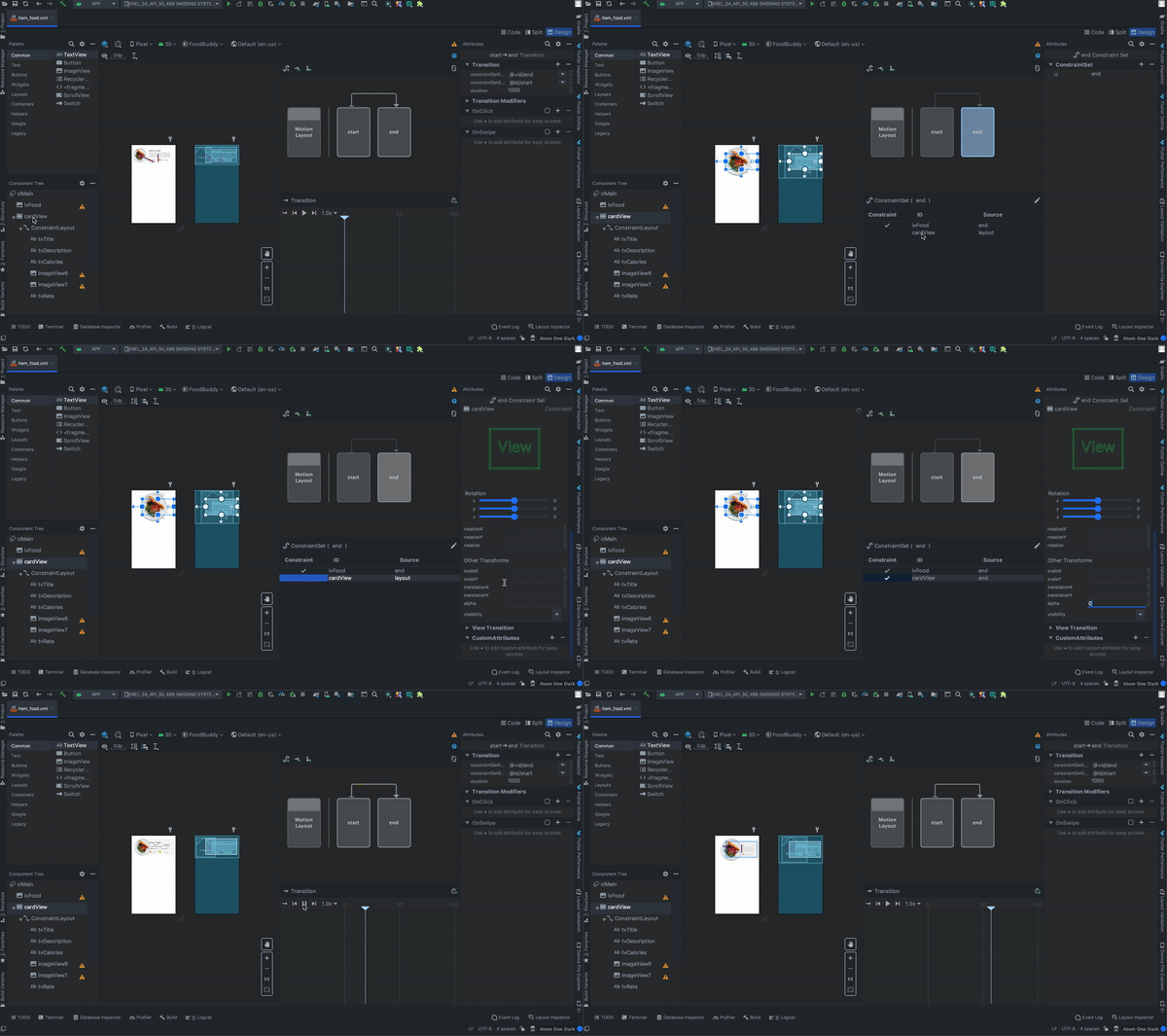
:
cardView (constraintView , , );
MotionLayout end;
cardView ConstraintSet;
Transforms;
alpha 0.
: (end) (start) alpha. ( ).
8:
, :
OnClick ( «+»);
targetId ivFood;
;
ClickAction toggle.
:
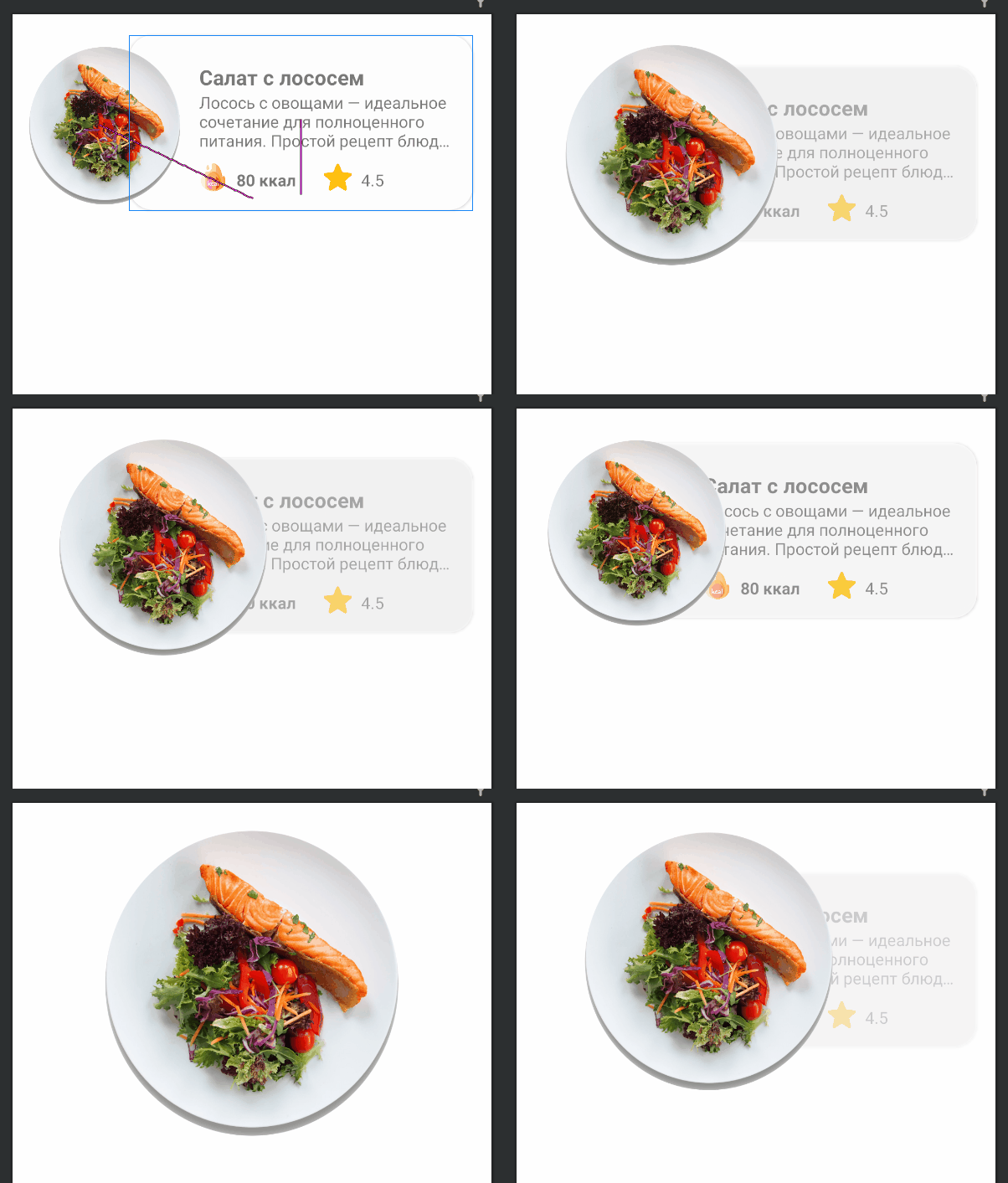
9: RecyclerView activity_main.xml
<?xml version="1.0" encoding="utf-8"?>
<androidx.constraintlayout.widget.ConstraintLayout xmlns:android="http://schemas.android.com/apk/res/android"
xmlns:app="http://schemas.android.com/apk/res-auto"
android:layout_width="match_parent"
android:layout_height="match_parent">
<androidx.recyclerview.widget.RecyclerView
android:id="@+id/rvMain"
android:layout_width="match_parent"
android:layout_height="match_parent"
app:layout_constraintBottom_toBottomOf="parent"
app:layout_constraintEnd_toEndOf="parent"
app:layout_constraintStart_toStartOf="parent"
app:layout_constraintTop_toTopOf="parent" />
</androidx.constraintlayout.widget.ConstraintLayout>
10:
package com.mjmanaog.foodbuddy.data.model
import com.mjmanaog.foodbuddy.R
data class FoodModel(
val title: String,
val description: String,
val calories: String,
val rate: String,
val imgId: Int
)
val foodDummyData: ArrayList<FoodModel> = arrayListOf(
FoodModel(
" ",
" — . , : , .",
"80 ",
"4.5",
R.drawable.img_salmon_salad
),
FoodModel(
" -",
" , , .",
"80 ",
"4.5",
R.drawable.img_chicken
),
FoodModel(
" ",
" — . , . .",
"80 ",
"4.5",
R.drawable.img_chicken_rice
),
FoodModel(
" ",
" , ( ), , , , , , , .",
"80 ",
"4.5",
R.drawable.img_salad
),
FoodModel(
" ",
" — . , : , .",
"80 ",
"4.5",
R.drawable.img_healthy
)
)
11: ViewHolder
. FoodModel
12: RecyclerView
class MainActivity : AppCompatActivity() {
private var foodAdapter: FoodAdapter = FoodAdapter()
override fun onCreate(savedInstanceState: Bundle?) {
super.onCreate(savedInstanceState)
setContentView(R.layout.activity_main)
rvMain.layoutManager = LinearLayoutManager(this, RecyclerView.VERTICAL, false)
rvMain.adapter = foodAdapter
foodAdapter.addAll(foodDummyData)
}
}
À la suite de ces actions simples, nous avons obtenu l'animation suivante:
Je n'ai pas ajouté le GIF de l'article, car
Elle porte 11 Mo.
Autre chose
Le fichier item_food_scene.xml contient une description de l'animation que nous avons configurée. Personne ne vous dérange pour créer et éditer manuellement des animations dans des fichiers de scène.
J'espère que le contenu de cet article sera utile à quelqu'un. Ce sera cool si vous en apprenez quelque chose de nouveau.
Merci de votre attention.